A My Aged Care Online Account lets you manage important aged care information through myGov. You can view assessment outcomes, service approvals, referral codes, letters and contact details in one secure place. The account can also help you follow updates about Support at Home services. To access it, you must be registered with My Aged Care and link the service to your myGov account.
Key Takeaways
- Link My Aged Care to your myGov account to access aged care information online.
- View assessment outcomes, care approvals, referral codes, support plans and letters.
- Update personal details and choose how you receive My Aged Care notifications.
- Check whether you are approved for Support at Home services.
- Appoint or manage a Registered Supporter through your support network information.
- Call My Aged Care on 1800 200 422 if you need help with access or your record.


A My Aged Care online account gives you a secure place to check important aged care information. It can help you follow your assessment, approvals and next steps without needing to call for every update.
This article explains what you can do online, how to link your account and where to get help.
What is a My Aged Care Online Account?
My Aged Care is the Australian Government’s starting point for people seeking government-funded aged care services. It can help you understand services, apply for an assessment and connect with providers.
You can contact My Aged Care by phone, email or in person. A My Aged Care Online Account gives you another way to check your aged care information in one place.
You can set up a My Aged Care online account through myGov. You must first be registered with My Aged Care, then link the My Aged Care service to your myGov account.
You only need to link the service once. After that, sign in to myGov and select the My Aged Care service tile to access your account.
How to Access Your My Aged Care Online Account via myGov
To access your My Aged Care Online Account, you need to link it to your myGov account. You only need to do this once.
- Sign in to your myGov account using your username and password. A security code may be sent by SMS or email. Enter the code when prompted.
- Once you are signed in to myGov, select View and link services. Find My Aged Care and select Link.
- Enter an identification number. This can be your Aged Care ID, Medicare number, Veteran Card number or Centrelink Customer Reference Number.
- Confirm your name and contact details.
Visit myGov for detailed instructions on linking your myGov account and My Aged Care Online Account.
Once you have linked your accounts, the My Aged Care service tile will appear on your myGov account homepage next to your other linked service.
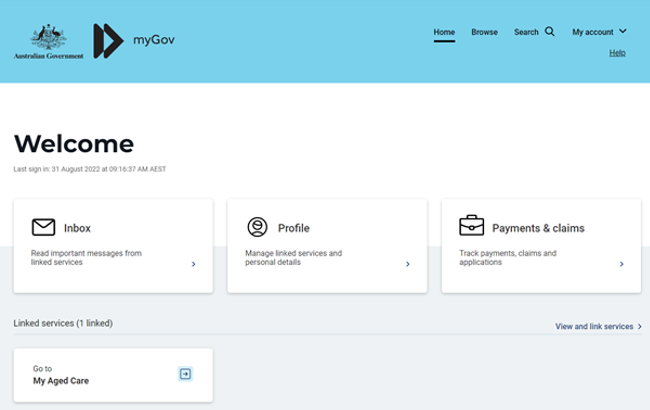
The next time you want to access your My Aged Care Online Account, you can sign in to myGov and select the My Aged Care this service tile. This will direct you to your My Aged Care Online Account.
How to Set Up Your MyGov Account
If you do not have a myGov account, create one before linking My Aged Care.
- Go to myGov and select “Create account”. You will find the button in the top-right corner.
- Choose “Continue with email”. You can instead use a Digital Identity if you already have one.
- Read the Terms of use and privacy notice. Tick the boxes to confirm you understand them, then select Next.
- Enter your email address. Each myGov account needs its own email address. You cannot use an address already linked to another myGov account.
- Enter the emailed code. myGov will email a code to confirm your address. Enter it, then select Next.
- Add your mobile number, if you wish. You can select Skip this step if you do not have a mobile phone or reliable reception.
- Enter the texted code. If you add a mobile number, myGov will send a code. Enter it, then select Next.
- Create a password. Enter and re-enter a password that meets the requirements shown on screen.
- Set 3 secret questions and answers. Choose questions from the list or write your own. Make the answers easy to remember but difficult for others to guess.
- Save your myGov username securely. myGov shows it on screen and sends it by email. You can then sign in and link My Aged Care.
Watch the Australian Government’s video guide below, for more detail about setting up a myGov account.
What Can You Do with My Aged Care Online?
Your My Aged Care Online Account home page brings key information together in one place. From here, you can select tiles to view your services, support plans, care approvals, personal details, documents and support network. If you receive or are approved for Support at Home, you can also check related approvals and service information here.
The image below shows the main sections available from the home page.
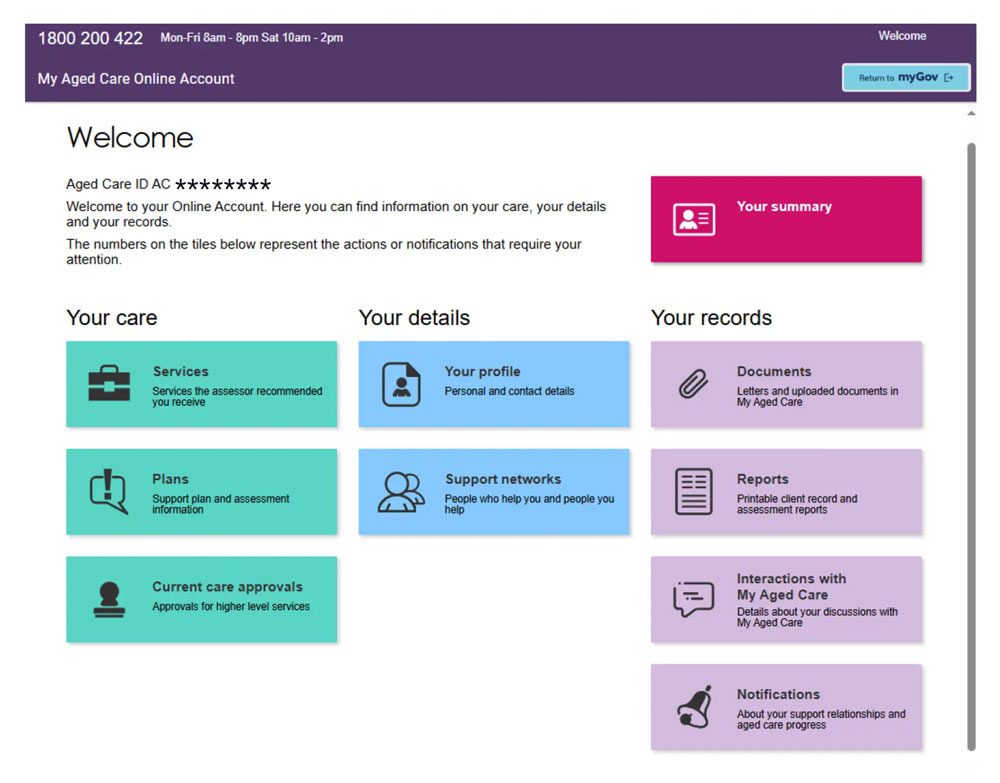
The home page is divided into 3 areas: Your care, Your details and Your records. Each tile opens a different part of your account, such as your services, support plan, contact details, documents and notifications.
Your Summary
An overview of your aged care information
View a history of your assessments, services you are approved for or currently receiving, recommendations and approvals. This section can help you understand where you are in your aged care journey.
Your Care
Services
Your current aged care servicesView the type of services you are currently receiving. You can also find or reactivate referral codes to give to a new provider when you are arranging services.
Plans
Your aged care support plansView support plans created from your assessment. These outline your needs, goals and the services recommended for you.
Current Care Approvals
The care types you are currently approved to receive.Check your current approvals, including Support at Home services or residential aged care. If you are approved for Support at Home, you can also change your seeking-services preference here.
Your Details
Your Profile
The care types you are currently approved to receive.View and update your contact details. You can also find your Aged Care ID, which begins with AC followed by 8 digits. Choose how My Aged Care contacts you, including by email, SMS or letter.
Support Networks
The people and organisations connected to your aged care record.View and manage the Aged Care Registered Supporters, emergency contacts and appointed decision-makers on your account.
Your Records
Documents
Documents uploaded to My Aged CareCheck the status of uploaded documents, such as supporter registration forms, legal documents or information requested by My Aged Care.
Reports
Reports about your aged care.View and print available reports, including those created by assessors and service providers.
Interactions with My Aged Care
Your contact history.
View the types and dates of previous interactions, including calls, online enquiries, emails and letters.
Notifications
Messages from My Aged Care.
Read alerts and messages about aged care services and support relationships.
My Aged Care has produced this handy video guide that walks you through what you can see and do in your online account.
Where to Get Help with Your Online Account
Online accounts can feel fiddly, especially when you are already managing assessments, services or paperwork for someone else.
For step-by-step help with each account section, visit My Aged Care’s Online Account guides.
If you would rather speak to someone, call My Aged Care on 1800 200 422. They can help with your account, record, assessment, approvals or referral codes. The line is open Monday to Friday, 8am to 8pm, and Saturday, 10am to 2pm.
If using a computer is difficult, you do not need an Online Account. You can still register, arrange an assessment and manage aged care by phone, post or in person. Read our guide to navigating My Aged Care without a computer.
More Help with My Aged Care
Getting started with aged care can feel like a lot. These guides explain the process in plain English and help you take the next step.
- My Aged Care: How To Access Government-Funded Aged Care – Learn how to register, apply for an assessment and move from approval to services.
- Who Is Eligible For My Aged Care? – Check the usual eligibility rules and learn what happens at an assessment.
- How To Contact My Aged Care – Find the phone number, opening hours and other ways to get help.
- My Aged Care Fee Estimator – Get an indication of the fees you may pay for aged care.
- Navigating My Aged Care Without A Computer – Find practical options if you prefer to manage aged care by phone, post or in person.
- What Is An Aged Care Registered Supporter? – Learn how a trusted person can help you manage your aged care journey.
Need Help Finding an Aged Care Provider?
Once you have an aged care approval or referral code, we can help you compare suitable providers.
Get a free, independent Options Report based on your care needs, location and budget. There is no obligation.
FAQs
Can I Check Support At Home Updates Online?
Yes. Your online account can show your assessment outcome, support plan, service approvals, referral codes and current services.
If you are approved for Support at Home, check Current care approvals to see your approval and manage your seeking-services preference. You can choose whether you remain available for funding allocation.
The account may not show an exact date for funding allocation or when services will begin. Call My Aged Care on 1800 200 422 if you need help understanding your status or next steps.
For a clearer explanation of the program, read our Support at Home guide.
Do I Need A MyGov Account To Use My Aged Care Online?
Yes. You need a myGov account to access your My Aged Care online account.
You must also be registered with My Aged Care before you can link the service to myGov. Once linked, you only need to sign in to myGov and select the My Aged Care service tile.
If you do not want to use myGov, you can still manage aged care by phone, post or in person.
Can I Find My Aged Care Referral Code Online?
Yes. Sign in to your My Aged Care online account and select Services.
You can view your current and previous services, find existing referral codes and reactivate a code if you are changing providers. You may also be able to generate a referral code for an approved service.
Give your referral code to the provider you choose. It allows them to view the relevant assessment information and arrange services with you
Can Someone Else Access My My Aged Care Online Account?
Someone can help manage your aged care if they are formally connected to your My Aged Care record.
You can check people and organisations linked to your record through Support Networks in your online account. This may include a Registered Supporter or an Appointed Decision-Maker.
Family members cannot automatically access your aged care information. My Aged Care must have the right authority recorded before sharing personal information.
What If I Cannot Use A Computer Or MyGov?
You do not need a My Aged Care online account to access aged care.
You can register, arrange an assessment and manage services by calling My Aged Care on 1800 200 422. You can also ask about help by post or book an appointment with an Aged Care Specialist Officer.
Read our guide to navigating My Aged Care without a computer.